
Building a Production-Grade Data Pipeline
Honestly, when we first started on this, I didn't think it would be that complex. "We just need to move some data from their DB to ours" — famous last words. What followed was weeks of debugging, a handful of 2 AM incidents, and a lot of learnings we had to earn the hard way. This is that story.
01 — Overview
What Are We Actually Building?
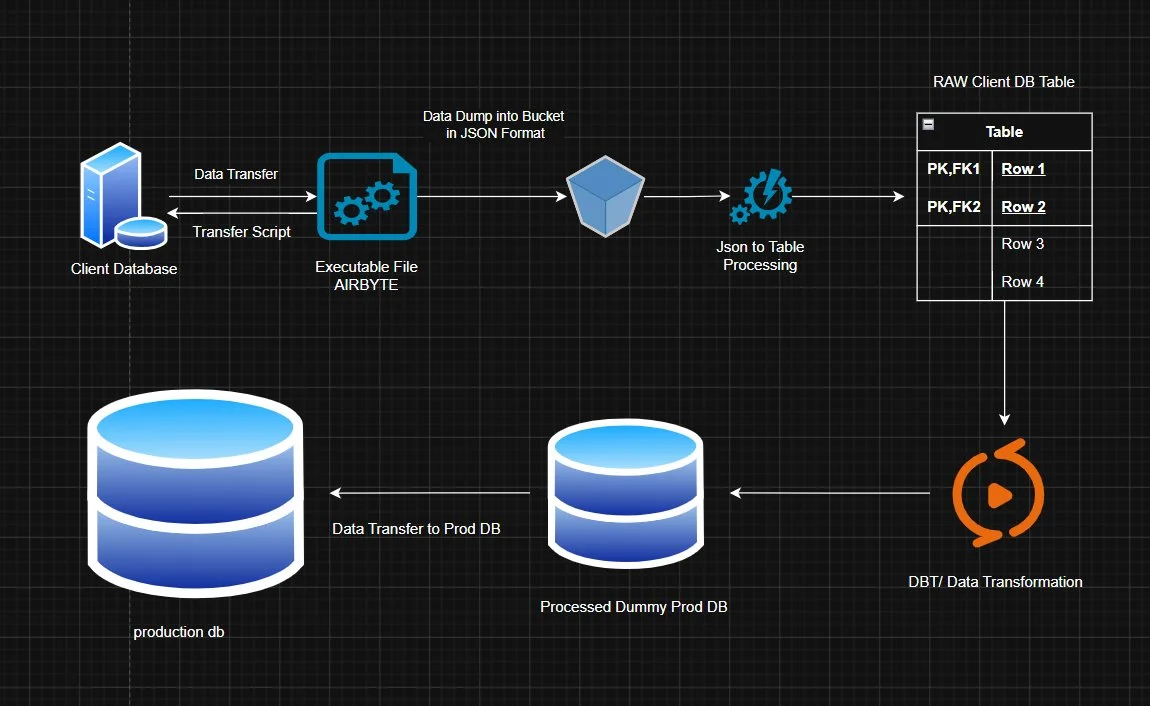
At its core, this is a batch ETL pipeline — Extract, Transform, Load — that moves data from a client's database into our system. Simple idea. The catch is we can't just reach into their DB directly; we ship them a small executable, they run it, and the data travels through a few carefully designed stages before it ever touches our production database. That middle part is where everything interesting (and painful) happens.
The result is a five-stage pipeline with multiple integrity checkpoints, a queue-based decoupling layer, and a staging database that acts as a buffer before any data ever touches production.
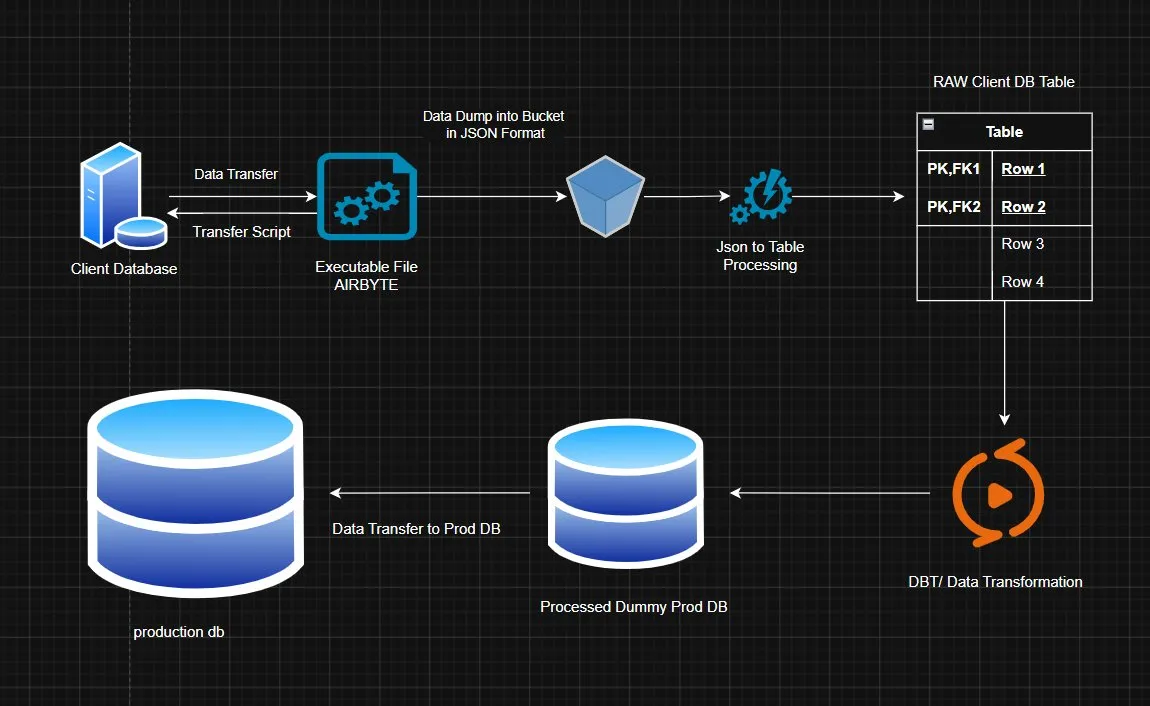
Figure 1 — End-to-end pipeline: from Client Database through extraction, raw staging, dbt transformation, and into Production DB.
02 — Pipeline Stages
The Five Steps, Explained
Here's how data moves through the system, step by step:
1. Client Extraction via Executable
We ship a small executable to the client. They run it, enter their database credentials, and it establishes a connection. On our backend, a script fetches all the relevant tables, serializes them to JSON, and uploads them to a cloud bucket. File naming follows a strict convention: TABLE_NAME-CLIENT_NAME-DATE.json (e.g. dim_patient-ehrlogic-14042026.json).
2. Bucket Trigger → Raw Table Creation
When JSON lands in the bucket, an event triggers a processing worker. This worker reads the JSON and creates raw tables in Supabase — exact replicas of the client's schema, with zero transformation. These tables include metadata columns: ingestion_id, client_name, source_file, and timestamp.
3. Dummy Production Schema (Schema 2)
On the same Supabase project, we maintain a second schema that's a complete replica of our production schema — all the same tables, constraints, and relationships. This is where transformed data lands before it ever touches real production.
4. Transformation via dbt (The Critical Step)
This is the heart of the pipeline. dbt models map client columns to our system schema, apply cleaning rules, handle type coercion, deduplicate records, and run business logic. The output lands in the dummy prod schema. Every run is idempotent — it's safe to re-run with the same data.
5. Promotion to Production DB
After validation passes, data is promoted from the dummy schema to the real production database using UPSERT operations with defined conflict resolution. Transactions ensure atomic writes — either everything lands, or nothing does.
03 — Edge Cases
What Can Go Wrong (And How We Handle It)
We didn't design all of this upfront. Most of it came from things actually breaking. Here are the eight edge cases we hit — or nearly hit — and what we did about each one:
Partial upload
JSON upload fails midway. Fixed with manifest files: pipeline only triggers when both data.json + manifest.json (checksum + row count) are present.
Duplicate ingestion
Client re-runs the executable. Fixed with idempotency keys — each job gets a job_id; duplicate jobs are detected and safely ignored.
Schema drift
Client renames or adds columns. Fixed with a schema registry that versions schemas per client and flags diffs before processing continues.
Out-of-order files
Yesterday's file arrives after today's. Fixed by including timestamps in filenames and processing with a queue that respects ordering by date.
Transformation failure
dbt model fails on bad data. The old raw tables are preserved (queue structure) until transformation succeeds — no data is deleted on failure.
Large files
Big client tables (millions of rows) cause memory issues. Fixed with paginated extraction and streaming JSON parsing on the worker side.
Concurrent processing
Two jobs for the same client run simultaneously. Fixed with per-client locks in Redis; only one active job per client at a time.
Network failures
Transient errors during upload or DB operations. Fixed with exponential backoff retry (3–5 attempts) at every network boundary.
Most critical: Step 4 (transformation)
We learned this the hard way. A client renamed one column and our dbt model silently produced wrong output for two days before anyone noticed. Now every client gets their own mapping config, and we never hardcode field names anywhere in the transformation layer.
04 — Design Decisions
Key Architectural Decisions
JSON files are never deleted
This one took some convincing internally. Storage isn't free, but it's cheap — and the alternative is losing your only copy of the original data when something goes wrong. We had a transformation bug in month two that would have been unrecoverable if we'd deleted the raw files. We don't delete them anymore.
Raw tables follow a queue model
Early on, we just overwrote the raw tables on each new load. The problem: if transformation failed halfway through, we'd lost our previous good data and had incomplete new data. Now we treat raw tables like a queue — old ones stay until the new ones are confirmed clean. It's a bit more storage overhead, but we've never lost data mid-flight since.
# File naming standard
{TABLE_NAME}-{CLIENT_NAME}-{DATE}.json

# Example files in bucket
dim_patient-ehrlogic-14042026.json
dim_patient-ehrlogic-14042026.manifest.json

# Bucket path structure (recommended)
client=ehrlogic/table=dim_patient/date=20260414/run_id=abc123/
  data.json
  manifest.json
Event-driven, not API-chained
We originally had each stage call the next one directly via API. That worked until it didn't — a slow client caused a cascade that backed everything up. Switching to a queue meant each stage became independent. Workers pick up jobs when ready. Failed jobs sit in the DLQ and you can see exactly where something got stuck. Debugging went from "where did it die?" to "oh, it's right there."
"We lost three hours once because a client's export had a phantom null in a column we assumed was always populated. Three hours. For one null. Now we validate everything."
— Kuldeep, during a very tired standup
05 — Stack
Recommended Technology Stack
| Layer | Tool | Purpose |
|---|---|---|
| Extraction | Python executable | Client-side DB connection and JSON export |
| Storage | S3 / GCS | Immutable JSON dump storage |
| Queue | SQS / PubSub | Event-driven decoupling between stages |
| Worker | FastAPI | Message processing and raw table creation |
| Raw + staging DB | Supabase (Postgres) | Raw schema + dummy prod schema |
| Transformation | dbt | SQL-based cleaning, mapping, deduplication |
| Cache / lock | Redis | Idempotency keys, per-client locks |
| Monitoring | Prometheus + logs | Job tracking, alerting, observability |
06 — Checklist
Production Readiness Checklist
Before we ship any new client integration, we go through this list manually. It's caught problems before they reached production more than once:
Extraction and storage
- Manifest file generated for every upload (row count + checksum)
- Pipeline only triggers when both data.json and manifest.json exist
- Structured path naming in bucket (client/table/date/run_id)
- JSON files are never deleted from the bucket
Queue and workers
- Bucket events go to a queue, not directly to an API
- Dead Letter Queue (DLQ) configured for failed messages
- Retry with exponential backoff (3–5 attempts)
- Per-client concurrency lock (no parallel jobs for same client)
Transformation and loading
- dbt models are idempotent (safe to re-run)
- Client-to-system column mapping is config-driven, not hardcoded
- Validation gates exist before data enters production
- Production load uses UPSERT with defined conflict resolution
Observability
- Job status tracked: PENDING → PROCESSING → SUCCESS / FAILED
- Alerts fire on repeated failures or DLQ buildup
- Every run traceable by job_id back to source file
07 — Rollout
Three-Phase Rollout Plan
Phase 1 — Now (foundation)
- Add manifest files
- Add queue layer
- Add idempotency
- Stop deleting raw data
Phase 2 — Next (hardening)
- dbt transformations
- Schema mapping configs
- Retry + DLQ system
- Schema drift detection
Phase 3 — Future (scale)
- CDC (Change Data Capture)
- Monitoring and alerting
- Incremental loads
- Multi-region support
Pro tip
We run failure simulations before every major release now. Deliberately fail an upload mid-transfer. Send a file without a manifest. Trigger two simultaneous jobs for the same client. If the system handles those gracefully, you can be confident it'll handle whatever a real client throws at it.
Honest thoughts at the end
I want to be real with you: when we shipped the first version of this pipeline, it was nowhere near what I've described here. There were no manifests, no queue, no idempotency. We were just reading the JSON, writing to the DB, and hoping for the best. It worked fine — until it didn't.
The stuff that broke us wasn't fancy. It was a client running the executable twice because "it seemed stuck." It was a JSON file that uploaded 90% of the way and silently stopped. It was a column renamed from patient_dob to dob with no heads up. None of these are exotic edge cases — they're just real life.
Every single design decision in this post came from something actually going wrong. The manifest file? Born from that partial upload. The idempotency key? Born from the double-run. The schema drift detection? Took us embarrassingly long to add, but we added it eventually.
So if you're building something similar and your first version is messy — that's fine. The goal isn't to design the perfect pipeline upfront. The goal is to build something you can observe, debug, and improve without losing sleep every time a client hits "run."
For healthcare-adjacent integrations and reliable practice data movement, we apply the same discipline to product work at Starfish Health.
We're not done yet either. CDC is still on the roadmap, monitoring needs more love, and I'm sure the next weird edge case is already on its way. But at least now when something breaks, we know exactly where to look.
Questions about this pipeline or practice data integrations? Connect on LinkedIn or learn more at Starfish Health.
Related articles
Jun 5, 2026·6 min read
How We Automated WhatsApp Onboarding for Every Client (Without Touching Meta's Dashboard)
A walkthrough of how we used Meta's Embedded Signup and the WhatsApp Cloud API to let clients self-onboard their WhatsApp number — entirely through code.
May 22, 2026·7 min read
Optometry Patient Engagement Vendors in Dallas: 2026 Vendor Comparison
Compare the top optometry patient engagement vendors for Dallas, TX practices in 2026 — Starfish Health vs. DoctorConnect, Adit, RevEngage, and Weave.
Apr 7, 2026·6 min read
Taming Background Noise in Real-Time Voice Agents
How we stopped our AI voice agent from interrupting itself every time a door closed.